Weekly Reflection #5 Knowledge Management Tools
My two tools for critical reflection this week are Google Keep and Google Classroom.
- Google Keep
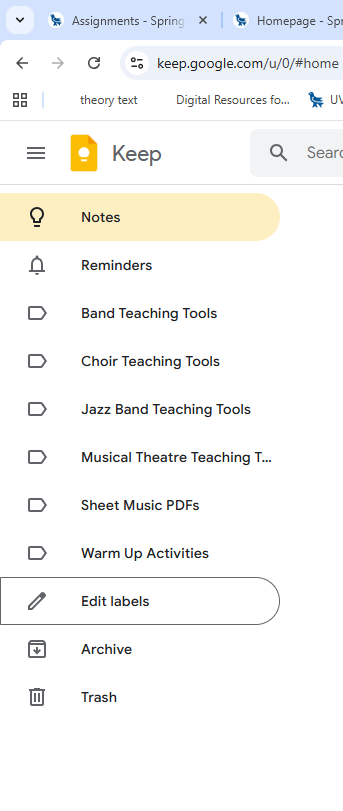
Before this week, I had never heard of Google Keep. I have known for a very long time that I wanted to be a music teacher, and I have been receiving a vast array of resources for the last five years during my undergrad and PDP. I always wanted to keep them somewhere safe, so I would have access to them in my first year of teaching; This has proven exceptionally difficult. I wish I had known about Google Keep sooner because I explored it and made content tabs for the different musical ensembles/classes that I will likely teach, as seen in my image. From this point on, I plan to use Google Keep in an effort to keep track of the many resources I will receive from colleagues and professional development seminars.
2. Google Classroom

I have known about Google Classroom for a long time, but I have only used it once in the role of a student. The video that you linked for this week was exceptionally easy to follow, and I am surprised by how user-friendly the entire app really is for teachers. As you can see in the attached image, I created a mock classroom, making an announcement, an assignment for marks, and an assignment without marks. I really like having the ability to create assignments that are not for marks. I sincerely hope that the school that I end up working at uses this platform because it seems like a quality tool for communicating with students and for teachers to reuse their classroom for the following year.
I went a step further than the video and looked into how a school can get access to Google Workspace for Education. What I found was a free version that seemed awfully reasonable and a premium version that seemed very expensive at a rate of $6.00 USD per user. I assume they are talking about each student in the school, and I think this price is way too high for a lot of Canadian public schools. Overall, I am very happy that a free version exists.
https://edu.google.com/intl/ALL_us/workspace-for-education/editions/compare-editions
Here is a link to the pricing that I found.